
DiffFind Review
DiffFind helps you compare text, documents, and API requests with AI-powered analysis for meaningful insights.
Reviewed and updated on
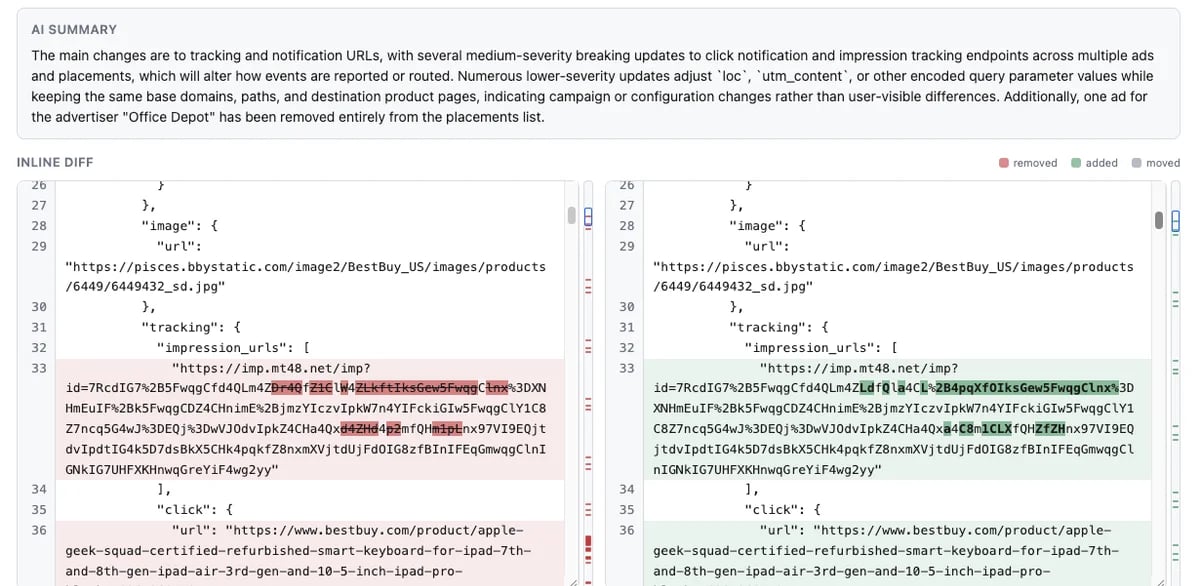
What Is DiffFind?
An AI-powered document and text comparison tool that combines deterministic lexical diffing with semantic analysis to reveal exactly what changed and what those changes mean across multiple file formats.
Target Audience of DiffFind
How To Use DiffFind?
Open the DiffFind app, paste text or upload files for both before and after versions, choose format and comparison options (character, word, sentence, line, or paragraph), then optionally enable semantic analysis to interpret the meaning of changes. Use the REST API or cURL commands to automate comparisons programmatically.
Core Features of DiffFind
- Deterministic comparison by character, word, sentence, line, or paragraph with tracked additions, removals, and moved text
- Optional AI-powered semantic analysis that explains the meaning and impact of changes
- Multi-format support including plain text, PDF, Word (DOCX), Excel (XLS/XLSX), JSON, YAML, XML, and CSV
- Semantic Find for searching documents by meaning rather than exact keywords
- API and cURL request/response comparison with automation
- REST API and agent-ready functions for integrating comparisons into workflows
- Chrome extension (DiffFind Launcher) for one-click access
- Desktop application for macOS and Windows with offline support
- Evidence-based output where cited facts are verified against source documents
Use Cases of DiffFind
- Comparing contracts, invoices, budgets, and policy documents to identify changed terms before signing
- Reviewing redlined drafts of resumes, emails, articles, and reports
- Detecting breaking changes between versions of API requests and responses
- Auditing structured data changes in JSON, YAML, XML, and CSV files
- Performing semantic search inside lease agreements, legal documents, and PDFs
- Automating regression checks across document versions in CI/CD pipelines
- Validating proposed edits against source documents with cited evidence
FAQ from DiffFind
Pricing of DiffFind
DiffFind is Paid service
Basic
Free
Free basic comparison available forever via the desktop app.
Pro
Subscription
Full Pro features with a 90-day free trial on the desktop app, plus subscription tiers via the web app.
Contact & Company Information of DiffFind
DiffFind Company Name: DiffFind
DiffFind Support Email:contact@difffind.com
DiffFindCustomer Service Contact
DiffFind Login
DiffFind Login Link:https://app.difffind.com/
DiffFind Sign Up
DiffFind Sign Up Link:https://app.difffind.com/
Information
 Jeremy Barton
Categories
Tags
 Screentell