
AutoCropper Review
AutoCropper: AI-powered tool automates photo cropping & splitting from scanned images. Batch process, correct rotation, and download in full quality.
Reviewed and updated on
What Is AutoCropper?
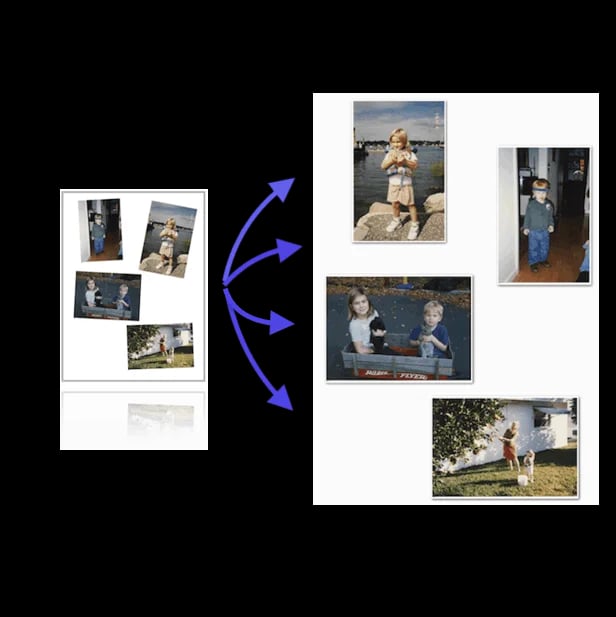
AutoCropper is an AI-powered online tool designed to automatically detect, crop, and split individual photos from scanned images into separate files with precision and speed.
Target Audience of AutoCropper
How To Use AutoCropper?
Upload your scanned images to AutoCropper via the website. The tool will automatically detect and crop individual photos, apply rotation corrections if needed, and allow you to download the separated images as individual files. Use the advanced editor for precise adjustments if required.
Core Features of AutoCropper
- Automatic detection and cropping of individual photos from scans
- Batch processing of multiple images at once
- Automatic rotation detection and correction
- Full-quality uploads and downloads with no compression
- Advanced editor for precise crop adjustments
- Resizable and rotatable crop areas
- EXIF encoding for metadata like titles and tags
Use Cases of AutoCropper
- Digitizing large photo collections quickly
- Splitting multiple scanned images for digital archivists
- Streamlining workflows for image professionals
- Batch cropping for card sellers and hobbyists
- Enhancing photo scanning efficiency for personal use
FAQ from AutoCropper
Pricing of AutoCropper
AutoCropper is Paid service
Free Plan
Free
Basic access to cropping tools with limited batch processing.
Pro Plan
Paid (exact price on pricing page)
Unlimited batch cropping, full-quality downloads, and advanced editor features.
Contact & Company Information of AutoCropper
AutoCropper Company Name: AutoCropper
AutoCropperCustomer Service Contact
Information
 Shawn Hacks
Tags
 Screentell